MySQL EXPLAIN Explained: A Complete Guide to Reading Query Execution Plans
Learn how to read MySQL EXPLAIN output, understand all 12 fields including type, key, and Extra, and use execution plans to diagnose and optimize slow SQL queries.
MySQLEXPLAINSQL OptimizationPerformance TuningIndexDatabase
1980 Words
2019-09-06

EXPLAIN is the single most useful tool for understanding MySQL query performance. When a query runs slower than expected, the first thing you should do is prefix it with EXPLAIN to inspect the execution plan. It reveals how MySQL processes your query – which indexes it picks, how many rows it expects to scan, and what join strategy it uses.
This guide walks through every field in the EXPLAIN output so you can quickly pinpoint performance bottlenecks.
Basic Usage
Using EXPLAIN is straightforward – just add the keyword before any SELECT statement:
EXPLAIN SELECT * FROM users WHERE id = 1;
MySQL 8.0 and later support several output formats:
-- Traditional tabular format (default)
EXPLAIN SELECT * FROM users;

-- JSON format with additional detail
EXPLAIN FORMAT=JSON SELECT * FROM users;

-- Tree format showing execution order
EXPLAIN FORMAT=TREE SELECT * FROM users;

-- Actually runs the query and reports runtime stats (MySQL 8.0.18+)
EXPLAIN ANALYZE SELECT * FROM users;
Warning:
EXPLAIN ANALYZEexecutes the query for real, so be careful with statements that modify data.
The 12 EXPLAIN Output Fields
EXPLAIN returns a row per table involved in the query. Each row contains 12 columns:
| Field | Meaning |
|---|---|
| id | Sequence number of the SELECT |
| select_type | Type of SELECT (simple, subquery, derived, etc.) |
| table | The table this row refers to |
| partitions | Matched partitions (NULL if not partitioned) |
| type | Access method (critical for performance) |
| possible_keys | Indexes the optimizer considered |
| key | Index the optimizer actually chose |
| key_len | Number of bytes used from the chosen index |
| ref | Columns or constants compared against the index |
| rows | Estimated number of rows to examine |
| filtered | Percentage of rows remaining after WHERE filtering |
| Extra | Additional execution details (critical for performance) |
Let’s examine each field in detail.
id – Query Sequence Number
The id indicates execution order:
- Same id: rows execute top to bottom
- Different ids: higher id executes first
- NULL id: represents a result set (e.g., UNION RESULT) rather than a table access
-- Subquery example
EXPLAIN
SELECT * FROM orders
WHERE user_id IN (SELECT id FROM users WHERE status = 1);
select_type – Query Type
The select_type tells you what kind of SELECT each row belongs to:
| Type | Meaning |
|---|---|
| SIMPLE | Plain query with no subqueries or UNIONs |
| PRIMARY | Outermost SELECT |
| SUBQUERY | Subquery in SELECT or WHERE clause |
| DERIVED | Subquery in the FROM clause (derived table) |
| UNION | Second or later SELECT in a UNION |
| UNION RESULT | Result-merging step of a UNION |
| DEPENDENT SUBQUERY | Correlated subquery (re-evaluated per outer row) |
| DEPENDENT UNION | Correlated UNION |
| MATERIALIZED | Materialized subquery |
-- SIMPLE
EXPLAIN SELECT * FROM users WHERE id = 1;

-- SUBQUERY
EXPLAIN SELECT * FROM orders
WHERE user_id = (SELECT id FROM users WHERE name = 'test');

-- DERIVED
EXPLAIN SELECT * FROM (SELECT * FROM users WHERE status = 1) AS t;
table – Table Name
Shows which table the row describes. Special values include:
<derivedN>: derived table from subquery with id N<unionM,N>: UNION result of ids M and N<subqueryN>: materialized subquery with id N
partitions
If the table is partitioned, this shows which partitions were accessed. NULL for non-partitioned tables.
type – Access Method (Critical)
The type column is one of the most important things to check. It describes how MySQL finds rows in the table. Ranked from best to worst performance:
system > const > eq_ref > ref > fulltext > ref_or_null >
index_merge > unique_subquery > index_subquery > range > index > ALL
Access Type Reference
| type | Performance | Description | When It Happens |
|---|---|---|---|
| system | Best | Table has exactly one row | Special case of const |
| const | Excellent | At most one matching row, read once | Equality on PRIMARY KEY or UNIQUE index |
| eq_ref | Very good | One row per combination from previous tables | JOIN on PRIMARY KEY or UNIQUE NOT NULL |
| ref | Good | All matching rows from an index | Equality on non-unique index or leftmost prefix of unique index |
| fulltext | Fair | Full-text index lookup | MATCH … AGAINST query |
| ref_or_null | Fair | Like ref, plus a second pass for NULLs | WHERE col = val OR col IS NULL |
| index_merge | Fair | Multiple indexes merged | Optimizer combines results from several indexes |
| range | Fair | Index range scan | BETWEEN, <, >, IN with an indexed column |
| index | Poor | Full index scan (reads every entry in the index) | Covers the query but no usable range condition |
| ALL | Worst | Full table scan | No usable index at all |
Practical Examples
-- const: primary key equality
EXPLAIN SELECT * FROM users WHERE id = 1;
-- type: const

-- ref: non-unique index lookup
EXPLAIN SELECT * FROM users WHERE email = '[email protected]';
-- type: ref (assuming a non-unique index on email)

-- range: range scan
EXPLAIN SELECT * FROM orders WHERE created_at > '2024-01-01';
-- type: range (assuming an index on created_at)

-- ALL: full table scan
EXPLAIN SELECT * FROM users WHERE name LIKE '%test%';
-- type: ALL (leading wildcard prevents index use)
Rule of thumb: aim for
rangeor better. If you seeALLon a large table, you almost certainly need an index.
possible_keys – Candidate Indexes
Lists every index that MySQL considered for this table. An index appearing here does not guarantee it will be used – it’s just a candidate.
key – Chosen Index
The index MySQL actually picked. NULL means no index was used.
Sometimes key shows an index not listed in possible_keys. This happens when MySQL discovers a covering index that satisfies the query entirely from the index without touching the table data.
key_len – Index Bytes Used
The number of bytes from the index that MySQL actually uses. This is especially useful for composite indexes – it tells you how many columns of the index are being utilized:
-- Suppose there is a composite index idx_name_age(name, age)
-- name VARCHAR(50), age INT

EXPLAIN SELECT * FROM users WHERE name = 'test';
-- key_len: 152 (50*3 + 2 for VARCHAR with utf8)

EXPLAIN SELECT * FROM users WHERE name = 'test' AND age = 25;
-- key_len: 157 (152 + 4 for INT + 1 for NULL flag)
key_len calculation rules:
CHAR(n): n x character set bytesVARCHAR(n): n x character set bytes + 2INT: 4 bytesBIGINT: 8 bytesDATE: 3 bytesDATETIME: 8 bytes- Nullable columns add 1 extra byte
ref – What’s Compared to the Index
Shows which columns or constants are matched against the index named in key. Common values:
const: a literal valueschema.table.column: a column from another table in a JOINfunc: a function result
rows – Estimated Row Count
MySQL’s estimate of how many rows it needs to examine. This is an approximation based on index statistics, not an exact count.
Lower is better. A high rows value signals that the query may be doing more work than necessary.
filtered – Post-filter Percentage
The estimated percentage of rows that survive the WHERE clause after the initial access method.
rows x filtered% gives the estimated number of rows passed to the next step.
-- If rows = 1000 and filtered = 10.00
-- roughly 100 rows are expected to reach the next stage
Extra – Additional Execution Details (Critical)
The Extra column packs a lot of actionable information.
Performance Warning Signs
| Value | Meaning | What to Do |
|---|---|---|
| Using filesort | MySQL must perform an extra sorting pass | Add an index that covers both the WHERE and ORDER BY columns |
| Using temporary | A temp table is created | Common with GROUP BY, DISTINCT, or ORDER BY on non-indexed columns |
| Using where | Rows are filtered by the server layer after the storage engine fetches them | Normal in many cases, but heavy filtering may indicate a missing index |
Good Signs
| Value | Meaning |
|---|---|
| Using index | Covering index – all needed data comes from the index, no table lookup required |
| Using index condition | Index Condition Pushdown (ICP) – filtering happens inside the storage engine |
| Using index for group-by | GROUP BY resolved via index |
| Using index for skip scan | Skip scan optimization (MySQL 8.0+) |
Other Common Values
| Value | Meaning |
|---|---|
| Impossible WHERE | WHERE condition is always false |
| Select tables optimized away | Result determined during optimization (e.g., MIN/MAX on an indexed column) |
| No matching min/max row | No rows satisfy the MIN/MAX condition |
| Distinct | MySQL stops searching after finding the first match |
| Using join buffer | Join buffer used (Block Nested Loop or Hash Join) |
| Using MRR | Multi-Range Read optimization |
Examples
-- Using index (covering index)
EXPLAIN SELECT id, name FROM users WHERE name = 'test';
-- With index idx_name(name), only id and name are needed

-- Using filesort
EXPLAIN SELECT * FROM orders ORDER BY amount;
-- No index on amount

-- Using temporary; Using filesort
EXPLAIN SELECT department, COUNT(*) FROM employees
GROUP BY department ORDER BY COUNT(*) DESC;
Visual Explain in MySQL Workbench
MySQL Workbench provides a Visual Explain feature that renders execution plans as interactive diagrams.
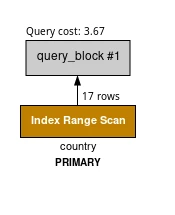
Color Coding
| Color | Access Types | Cost Level |
|---|---|---|
| Blue | system, const | Very low (optimal) |
| Green | eq_ref, ref, ref_or_null, index_merge | Low |
| Yellow | fulltext | Low |
| Orange | unique_subquery, index_subquery, range | Medium |
| Red | index, ALL | High (needs optimization) |
Reading Order
Visual Explain diagrams read bottom to top, left to right.
Real-World Optimization Examples
Example 1: Eliminating a Full Table Scan
-- Problem: full table scan
EXPLAIN SELECT * FROM orders WHERE status = 'pending';
-- type: ALL, rows: 100000

-- Fix: add an index
ALTER TABLE orders ADD INDEX idx_status(status);

EXPLAIN SELECT * FROM orders WHERE status = 'pending';
-- type: ref, rows: 500
Example 2: Removing filesort
-- Problem: extra sort operation
EXPLAIN SELECT * FROM orders WHERE user_id = 100 ORDER BY created_at;
-- Extra: Using filesort

-- Fix: composite index matching both WHERE and ORDER BY
ALTER TABLE orders ADD INDEX idx_user_created(user_id, created_at);

EXPLAIN SELECT * FROM orders WHERE user_id = 100 ORDER BY created_at;
-- Extra: Using index condition (filesort gone)
Example 3: Using a Covering Index
-- Problem: table lookup required
EXPLAIN SELECT id, name, email FROM users WHERE name = 'test';
-- Extra: NULL

-- Fix: covering index that includes all selected columns
ALTER TABLE users ADD INDEX idx_name_email(name, email);

EXPLAIN SELECT id, name, email FROM users WHERE name = 'test';
-- Extra: Using index (no table access needed)
Example 4: Optimizing a Multi-Table JOIN
EXPLAIN
SELECT o.id, c.name, c.email
FROM orders o
LEFT JOIN customers c ON c.id = o.customer_id
WHERE o.created_at > '2024-01-01';
Key things to check:
- type for each table – aim for eq_ref or ref on the joined table
- Indexes on join columns –
c.idando.customer_idshould both be indexed - rows product – multiply the rows values across tables to estimate total work
Pro Tips
1. Use SHOW WARNINGS to See the Rewritten Query
EXPLAIN SELECT * FROM users WHERE id IN (1, 2, 3);
SHOW WARNINGS;
The output reveals how the optimizer rewrote your query internally, which can explain unexpected execution plans.
2. Use FORMAT=JSON for Cost Details
EXPLAIN FORMAT=JSON SELECT * FROM users WHERE id = 1\G
The JSON output includes cost estimates (cost_info), actual index parts used, and other details not shown in the tabular format.
3. Use EXPLAIN ANALYZE for Runtime Statistics
EXPLAIN ANALYZE SELECT * FROM users WHERE status = 1;
Unlike plain EXPLAIN, this actually runs the query and reports real execution times, actual row counts, and loop iterations for each step.
Summary
EXPLAIN is an essential tool for MySQL performance work. Focus on these four columns first:
| Column | What to Look For |
|---|---|
| type | At least range; ideally ref or better |
| key | Confirm a suitable index is being used |
| rows | Lower is better |
| Extra | Watch out for Using filesort and Using temporary |
General optimization strategies:
- Add targeted indexes for columns in WHERE, JOIN, and ORDER BY clauses
- Use covering indexes to eliminate table lookups
- Avoid index-killing patterns like wrapping indexed columns in functions or using leading wildcards in LIKE
- Optimize JOINs by driving from the smaller table and ensuring all join columns are indexed
Comments
Join the discussion — requires a GitHub account