RabbitMQ Tutorial: AMQP Protocol, Exchanges, and Message Delivery
A comprehensive RabbitMQ tutorial covering the AMQP protocol, exchange types (direct, topic, fanout, headers), queue patterns, and practical PHP examples. Learn about producers, consumers, channels, and clustering.
1573 Words
2019-08-02
This guide builds on our message queue fundamentals article and dives deep into RabbitMQ — one of the most popular open-source message brokers.
1. What Is RabbitMQ?
RabbitMQ is an open-source message broker and queue server written in Erlang. It implements the AMQP (Advanced Message Queuing Protocol) — an open standard for messaging middleware.
2. RabbitMQ Architecture
The core architecture follows the AMQP model:
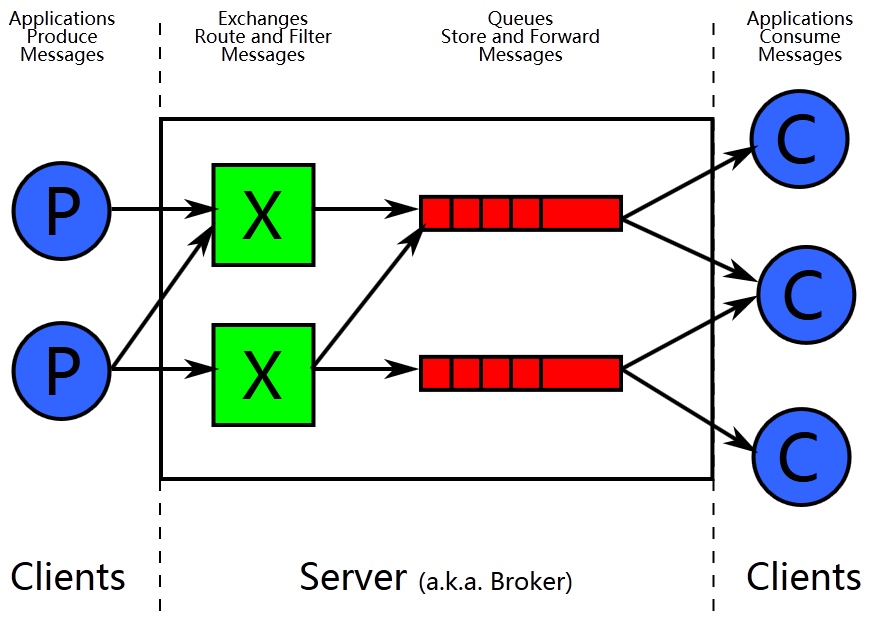
- Publisher sends a message to an Exchange
- The exchange routes the message to one or more Queues based on routing rules
- The Broker (RabbitMQ server) pushes the message to subscribed Consumers
Key reliability features from AMQP: message acknowledgments — messages aren’t removed from queues until consumers explicitly confirm they’ve been processed.
3. Core Concepts
Let’s start with the management interface — the easiest way to visualize these concepts:
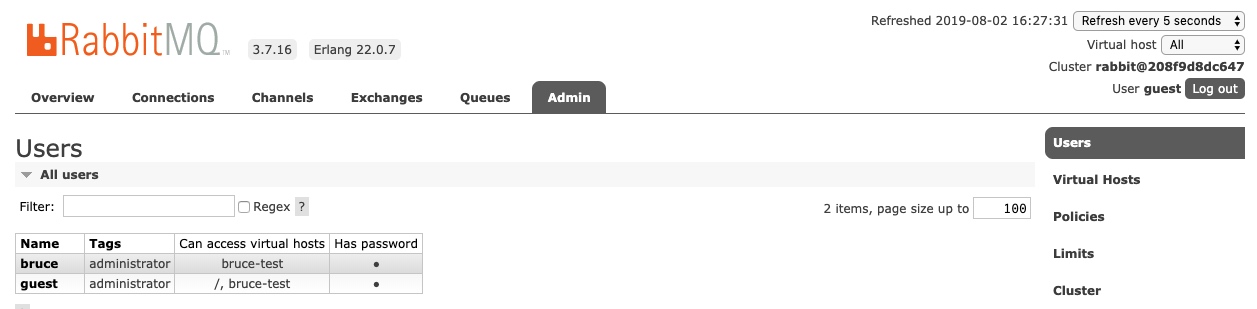
3.1 Producer & Consumer
The basics:
- Producer: Creates and sends messages
- Consumer: Receives and processes messages
3.2 Connection & Channel
- Connection: A TCP connection between client and server. Must be properly closed to avoid leaks.
- Channel: A virtual connection within a TCP connection. Each channel has a unique ID.
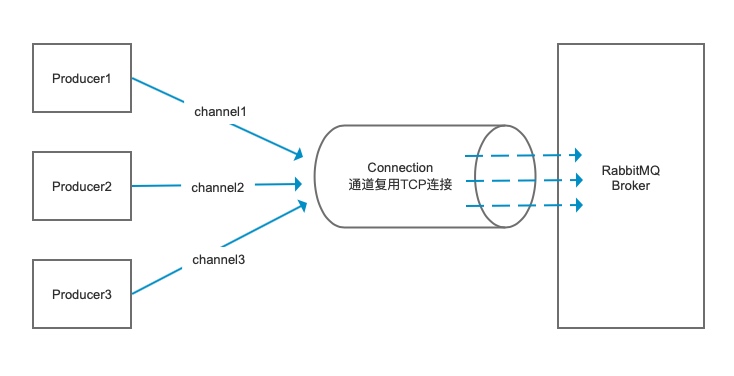
Channels allow efficient TCP connection reuse. Instead of creating a new TCP connection for every thread, you create a single connection and multiple channels — reducing resource overhead and improving scalability.
3.3 Exchange
The exchange is the routing agent. It receives messages from producers and routes them to queues based on routing rules. Producers never send messages directly to queues — they always go through exchanges.
3.4 Routing Key & Binding Key
- Routing Key: A label attached to every message by the producer
- Binding Key: A rule defined when binding an exchange to a queue
- Binding: The relationship between an exchange and a queue
3.5 Exchange Types
RabbitMQ supports four exchange types:
3.5.1 Direct Exchange
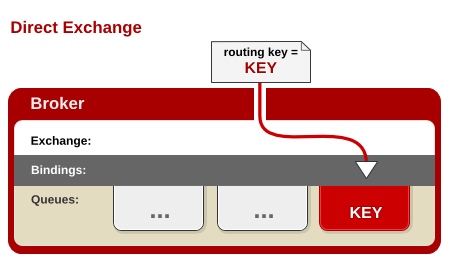
Routes messages to queues where the routing key matches the binding key exactly.
3.5.2 Topic Exchange
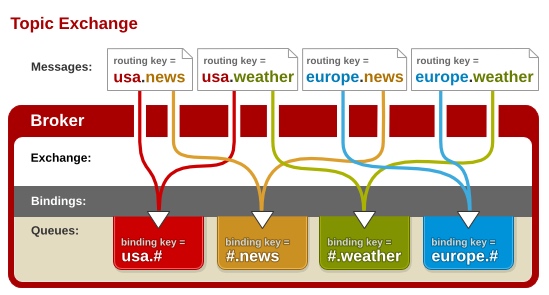
Supports wildcard routing using .-separated words:
*(asterisk) matches exactly one word#(hash) matches zero or more words
For example: lazy.# matches lazy.red.fox or lazy.rabbit
3.5.3 Fanout Exchange
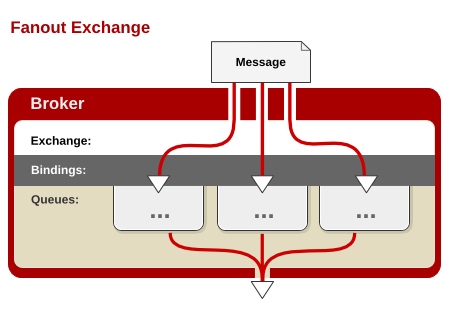
Ignores routing keys and broadcasts messages to all bound queues. This is the fastest exchange type.
3.5.4 Headers Exchange
Routes messages based on message header values rather than routing keys. Rarely used in practice.
3.6 Virtual Hosts (vhost)
Virtual hosts provide logical separation within a single RabbitMQ server — like having multiple brokers in one. Each vhost has its own users, exchanges, queues, and permissions.
4. Queue Patterns (PHP Examples)
All examples use the php-amqplib library:
use PhpAmqpLib\Connection\AMQPStreamConnection;
use PhpAmqpLib\Message\AMQPMessage;
Complete code: https://github.com/heyuan110/laravel-rabbitmq
4.1 Simple Queue (Point-to-Point)

One producer sends messages to one queue consumed by one consumer.
Producer:
public function publishSimpleMQ()
{
    $connection = new AMQPStreamConnection('172.16.166.130','5672','guest','guest','/');
    $channel = $connection->channel();
    $channel->queue_declare('hello',false,false,false,false);

    $msg = new AMQPMessage("hello world");
    $channel->basic_publish($msg,'','hello');
    echo " [x] Sent 'Hello World!'\n";

    $channel->close();
    $connection->close();
}
Consumer:
public function consumeSimpleMQ()
{
    $connection = new AMQPStreamConnection('172.16.166.130','5672','guest','guest','/');
    $channel = $connection->channel();
    $channel->queue_declare('hello',false,false,false,false);

    echo " [*] Waiting for messages. To exit press CTRL+C\n";

    $callback = function ($msg){
        echo '[x] Received ' . $msg->body . '\n';
    };
    $channel->basic_consume('hello','',false,true,false,false,$callback);
    while($channel->is_consuming()){
        $channel->wait();
    }

    $channel->close();
    $connection->close();
}
4.2 Work Queues (Task Distribution)
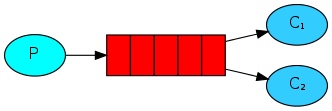
One producer sends messages to one queue consumed by multiple workers. Each message is processed by exactly one worker.
Key improvements:
- Message durability: Messages won’t be lost if RabbitMQ restarts
- Message acknowledgments: Messages aren’t removed until workers confirm processing
- Fair dispatch: Workers only get new messages when they finish processing current ones
Producer with durability:
public function produceWorkMQ()
{
    $connection = new AMQPStreamConnection('172.16.166.130','5672','guest','guest','/');
    $channel = $connection->channel();
    $channel->queue_declare('hello',false,true,false,false); // Durable queue

    $data = $this->option('msg') ?: "Hello World!";
    $msg = new AMQPMessage(
        $data,
        ['delivery_mode' => AMQPMessage::DELIVERY_MODE_PERSISTENT] // Persistent message
    );
    $channel->basic_publish($msg,'','hello');
    echo " [x] Sent '".$data."'\n";

    $channel->close();
    $connection->close();
}
Consumer with acknowledgments:
public function consumeWorkMQ()
{
    $connection = new AMQPStreamConnection('172.16.166.130','5672','guest','guest','/');
    $channel = $connection->channel();
    $channel->queue_declare('hello',false,true,false,false);

    $channel->basic_qos(null, 1, null); // Fair dispatch

    $callback = function ($msg){
        echo '[x] Received ' . $msg->body . '\n';
        sleep(substr_count($msg->body, '.'));
        echo " [x] Done\n";
        $msg->delivery_info['channel']->basic_ack($msg->delivery_info['delivery_tag']); // Ack
    };

    $channel->basic_consume('hello','',false,false,false,false,$callback); // No auto-ack
    while($channel->is_consuming()){
        $channel->wait();
    }

    $channel->close();
    $connection->close();
}
4.3 Publish/Subscribe (Fanout Exchange)
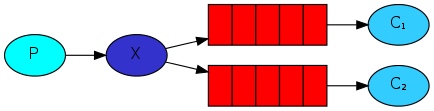
One message is received by all subscribers. Uses a fanout exchange.
Publisher:
public function publishMQ()
{
    $connection = new AMQPStreamConnection('172.16.166.130','5672','guest','guest','/');
    $channel = $connection->channel();
    $channel->exchange_declare('logs', 'fanout', false, false, false);

    $data = $this->option('msg') ?: "Hello World!";
    $msg = new AMQPMessage(date("Y-m-d H:i:s ").$data);
    $channel->basic_publish($msg,'logs');

    echo " [x] Sent '".$data."'\n";

    $channel->close();
    $connection->close();
}
Subscriber (with temporary queue):
public function subscribekMQ()
{
    $connection = new AMQPStreamConnection('172.16.166.130','5672','guest','guest','/');
    $channel = $connection->channel();
    $channel->exchange_declare('logs', 'fanout', false, false, false);

    list($queue_name, ,) = $channel->queue_declare("", false, false, true, false); // Temporary queue
    $channel->queue_bind($queue_name, 'logs');

    echo " [*] Waiting for logs. To exit press CTRL+C\n";

    $callback = function ($msg) {
        echo ' [x] ', $msg->body, "\n";
    };
    $channel->basic_consume($queue_name, '', false, true, false, false, $callback);

    while($channel->is_consuming()){
        $channel->wait();
    }

    $channel->close();
    $connection->close();
}
4.4 Routing (Direct Exchange)
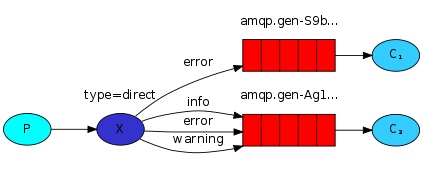
Messages are routed to queues based on exact routing key matches.
Publisher (with routing key):
public function publishMQ()
{
    $connection = new AMQPStreamConnection('172.16.166.130','5672','guest','guest','/');
    $channel = $connection->channel();
    $exchange_name = 'direct_logs';
    $channel->exchange_declare($exchange_name, 'direct', false, false, false);

    $routing_key = $this->option('level') ?: "info";
    $data = $this->option('msg') ?: "Hello World!";
    $msg = new AMQPMessage(date("Y-m-d H:i:s ").$data);
    $channel->basic_publish($msg,$exchange_name,$routing_key);

    echo ' [x] Sent ', $routing_key, ':', $data, "\n";

    $channel->close();
    $connection->close();
}
Subscriber (with routing key filter):
public function subscribekMQ()
{
    $connection = new AMQPStreamConnection('172.16.166.130','5672','guest','guest','/');
    $channel = $connection->channel();
    $exchange_name = 'direct_logs';
    $channel->exchange_declare($exchange_name, 'direct', false, false, false);

    list($queue_name, ,) = $channel->queue_declare("", false, false, true, false);
    $levels = explode(',', $this->option('level') ?: 'info');

    foreach ($levels as $routing_key) {
        $channel->queue_bind($queue_name,$exchange_name, $routing_key);
    }

    echo " [*] Waiting for logs. To exit press CTRL+C\n";

    $callback = function ($msg) {
        echo ' [x] ', $msg->delivery_info['routing_key'], ':', $msg->body, "\n";
    };
    $channel->basic_consume($queue_name, '', false, true, false, false, $callback);

    while($channel->is_consuming()){
        $channel->wait();
    }

    $channel->close();
    $connection->close();
}
Example usage:
php artisan consume:routing_mq --level="info,error,warning"
php artisan produce:routing_mq --level=error --msg="error:test data"
4.5 Topics (Topic Exchange)
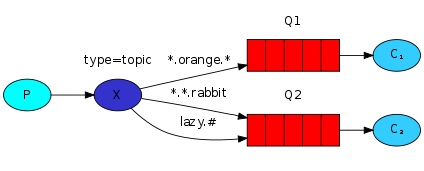
Supports wildcard routing for more flexible patterns.
Publisher:
public function publishMQ()
{
    $connection = new AMQPStreamConnection('172.16.166.130','5672','guest','guest','/');
    $channel = $connection->channel();
    $exchange_name = 'topic_logs';
    $channel->exchange_declare($exchange_name, 'topic', false, false, false);

    $routing_key = $this->option('routing_key') ?: "anonymous.info";
    $data = $this->option('msg') ?: "Hello World!";
    $msg = new AMQPMessage(date("Y-m-d H:i:s ").$data);
    $channel->basic_publish($msg,$exchange_name,$routing_key);

    echo ' [x] Sent ', $routing_key, ':', $data, "\n";

    $channel->close();
    $connection->close();
}
Subscriber:
public function subscribekMQ()
{
    $connection = new AMQPStreamConnection('172.16.166.130','5672','guest','guest','/');
    $channel = $connection->channel();
    $exchange_name = 'topic_logs';
    $channel->exchange_declare($exchange_name, 'topic', false, false, false);

    list($queue_name, ,) = $channel->queue_declare("", false, false, true, false);
    $binding_keys = explode(',', $this->option('binding_key') ?: 'info');

    foreach ($binding_keys as $binding_key) {
        $channel->queue_bind($queue_name,$exchange_name, $binding_key);
    }

    echo " [*] Waiting for logs. To exit press CTRL+C\n";

    $callback = function ($msg) {
        echo ' [x] ', $msg->delivery_info['routing_key'], ':', $msg->body, "\n";
    };
    $channel->basic_consume($queue_name, '', false, true, false, false, $callback);

    while($channel->is_consuming()){
        $channel->wait();
    }

    $channel->close();
    $connection->close();
}
Pattern matching examples:
php artisan consume:topic_mq --binding_key="*.white.dog"    # Matches quick.white.dog
php artisan consume:topic_mq --binding_key="lazy.#"         # Matches lazy.red.fox or lazy.rabbit
php artisan produce:topic_mq --routing_key="quick.red.fox" --msg="test1"
4.6 RPC (Remote Procedure Call)
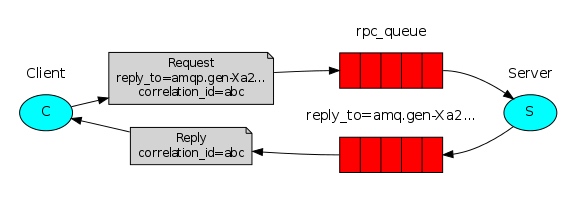
For request-response patterns using message properties:
reply_to: The queue for responsescorrelation_id: Associates responses with requests
Complete code: Client and Server
5. Installation & Clustering
5.1 Docker Installation (Quick Start)
docker run -d -p 5672:5672 -p 15672:15672 --name rabbitmq rabbitmq:management
Access the management interface at http://localhost:15672 with guest/guest.
5.2 Local Installation (Ubuntu 16.04)
# Install signing key
curl -fsSL https://github.com/rabbitmq/signing-keys/releases/download/2.0/rabbitmq-release-signing-key.asc | sudo apt-key add -
sudo apt-get install apt-transport-https

# Add repositories
sudo tee /etc/apt/sources.list.d/bintray.rabbitmq.list <<EOF
deb http://dl.bintray.com/rabbitmq-erlang/debian xenial erlang
deb https://dl.bintray.com/rabbitmq/debian xenial main
EOF

# Install RabbitMQ
sudo apt-get update -y
sudo apt-get install rabbitmq-server -y --fix-missing

# Enable management plugin
sudo rabbitmq-plugins enable rabbitmq_management

# Allow guest to connect from remote
sudo tee /etc/rabbitmq/rabbitmq.config <<EOF
[{rabbit, [{loopback_users, []}]}].
EOF
sudo service rabbitmq-server restart
5.3 User Management
# Create user
rabbitmqctl add_user bruce 123456

# Grant admin role
rabbitmqctl set_user_tags bruce administrator

# Grant permissions
rabbitmqctl set_permissions -p "/" bruce ".*" ".*" ".*"

# List users
rabbitmqctl list_users
5.4 Clustering
5.4.1 Normal Cluster Mode
All nodes share metadata (exchange/queue definitions), but message data is stored on only one node.
Unify Erlang cookies (required for clustering):
# Copy cookie from rmq1 to rmq2 and rmq3
scp /var/lib/rabbitmq/.erlang.cookie root@rmq2:/var/lib/rabbitmq/
scp /var/lib/rabbitmq/.erlang.cookie root@rmq3:/var/lib/rabbitmq/
sudo chmod 400 /var/lib/rabbitmq/.erlang.cookie
sudo service rabbitmq-server restart
Join cluster:
# On rmq2 and rmq3
rabbitmqctl stop_app
rabbitmqctl join_cluster rabbit@rmq1
rabbitmqctl start_app
5.4.2 Mirror Mode (High Availability)
Mirrors queues across multiple nodes for redundancy.
# Mirror all queues in all vhosts
rabbitmqctl set_policy ha-all "^" '{"ha-mode":"all","ha-sync-mode":"automatic"}'

# Mirror queues starting with "test" in /vhost1
rabbitmqctl set_policy -p vhost1 ha-test "^test" '{"ha-mode":"exactly","ha-params":2}'
Policy parameters:
ha-mode:all,exactly, ornodesha-params: Number of nodes (forexactly) or node names (fornodes)ha-sync-mode:automaticormanual
5.5 Load Balancing with HAProxy
global
        log /dev/log    local0
        log /dev/log    local1 notice
        chroot /var/lib/haproxy
        stats socket /run/haproxy/admin.sock mode 660 level admin
        stats timeout 30s
        user haproxy
        group haproxy
        daemon

defaults
        log     global
        mode    http
        option  httplog
        option  dontlognull
        timeout connect 5000
        timeout client  50000
        timeout server  50000

listen rabbitmq_cluster
    bind 0.0.0.0:5678
    option tcplog
    mode tcp
    timeout client  3h
    timeout server  3h
    balance roundrobin
    server   node1 192.168.8.131:5672 check inter 5s rise 2 fall 3
    server   node2 192.168.8.146:5672 check inter 5s rise 2 fall 3
    server   node3 192.168.9.123:5672 check inter 5s rise 2 fall 3
6. Common Problems & Solutions
6.1 How to Choose Node Type: RAM vs Disk
- RAM nodes: Store all data in memory (3x faster than disk)
- Disk nodes: Store data on disk (persistent)
To switch between modes:
rabbitmqctl stop_app
rabbitmqctl change_cluster_node_type ram
rabbitmqctl start_app
6.2 Flow Control
RabbitMQ automatically slows down producers if the broker becomes overloaded. Check connection status:
rabbitmqctl list_connections
Related Reading
- Message Queue Fundamentals — Core concepts and technology selection
- RabbitMQ Documentation — Official guide
Comments
Join the discussion — requires a GitHub account