OpenClaw Claude Code Workflow: How One Dev Built a 100K-Star Project
Deep dive into Peter Steinberger OpenClaw development methodology using Claude Code. Learn AGENTS.md documentation-driven development, multi-agent parallel workflows, and spec-driven building.
Claude CodeOpenClawAI CodingAgent EngineeringAGENTS.md
2731 Words
2026-01-31
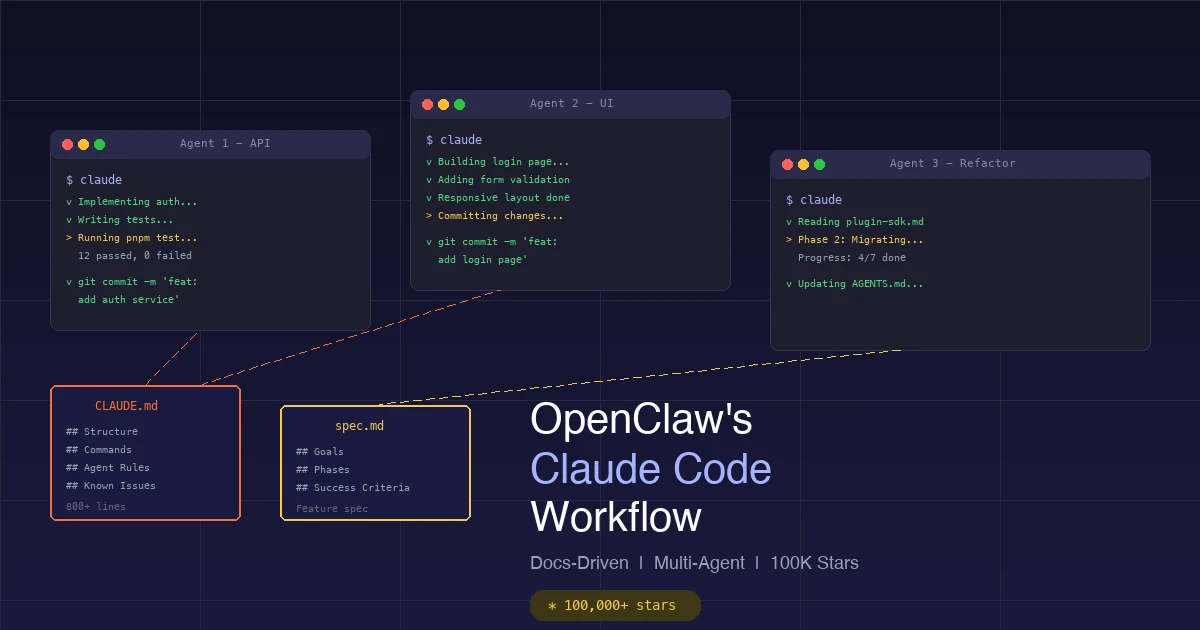
A project recently took the developer world by storm — OpenClaw (formerly Clawdbot), an open-source AI assistant that hit 60K GitHub stars in 72 hours, attracted 2 million visitors in a week, and has now surpassed 100K stars.
The most striking part is not how popular it became, but that there is only one person behind it — Austrian developer Peter Steinberger (@steipete). No team, no crunch time. He relied entirely on Claude Code and Codex CLI, running 5-10 agents in parallel and averaging 600+ commits per day.
Looking at the commit history, you would think it was a company:
“From the commits, it might appear like it’s a company. But it’s not. This is one dude sitting at home having fun.”
This article breaks down his entire development methodology so you can apply the same approach to your own projects with Claude Code.
Background: A Retired Developer Returns to the Arena
Peter Steinberger founded PSPDFKit (later sold for $119 million). After retiring in 2021, he disappeared for three years. In April 2025, he started coding again — but this time, his “hands” had changed. Instead of typing code himself, he let AI do the work.
His first attempt went like this:
- Dragged a 1.3MB Markdown file into Gemini and said: “Write a specification”
- Gemini produced a 400-line spec document
- Dragged the spec into Claude Code and said: “Build”
- Kept clicking “continue”
The program crashed. But he saw the potential.
Over the next 8 months, he refined a complete AI development methodology — from “Claude Code is my computer” to “I ship code I don’t read” — ultimately building the 100K-star OpenClaw.
Core Philosophy: Agent Engineering, Not Vibe Coding
Peter explicitly rejects the term “Vibe Coding.” He prefers to call it Agent Engineering:
- Humans handle: System architecture, product design, technology choices, quality control
- AI handles: Code implementation, debugging, testing, refactoring
This is not “let AI write something and see what happens.” It is a disciplined engineering methodology. His summary:
“Using AI simply means that expectations what to ship went up.”
Documentation-Driven Development — OpenClaw’s Core Secret
Open the OpenClaw GitHub repository and you will find two critical files in the root directory:
AGENTS.md— an 800+ line AI agent guidebookCLAUDE.md— a symlink pointing toAGENTS.md
These two files are the project’s “brain.” Every time Claude Code or Codex launches, it reads this file — like handing a new employee their operations manual.
What Does AGENTS.md Contain?
Peter describes AGENTS.md as:
“a collection of organizational scar tissue”
Meaning — every time they hit a bug or mistake, he had the AI add a note to this file to prevent the same error from recurring. He did not write this file himself; the AI writes and maintains it.
AGENTS.md covers 7 core modules:
Module 1: Project Structure
- Source code: src/ (CLI in src/cli, commands in src/commands)
- Tests: colocated *.test.ts (test files live next to source)
- Docs: docs/ (documentation directory)
- Plugins: extensions/* (plugin directory)
This tells the agent where the code lives, where tests go, and where docs are — no need to ask every time.
Module 2: Build/Test Commands
pnpm install          # install dependencies
pnpm build            # build
pnpm test             # run tests (vitest)
pnpm lint             # lint (oxlint)
pnpm format           # format (oxfmt)
pnpm test:coverage    # coverage tests
Why does this matter? Because AI agents must be able to self-verify — compile, test, and check their own output. This is a core principle Peter emphasizes repeatedly:
“The key is that the AI can verify its own work. It must be able to compile, lint, execute, and verify the output.”
Module 3: Coding Style
- Language: TypeScript (ESM). Prefer strict typing; avoid any.
- Keep files concise; extract helpers instead of "V2" copies
- Aim to keep files under ~700 LOC
- Naming: OpenClaw for product/docs; openclaw for CLI/package/paths
Module 4: Git Commit Conventions
# Use a custom script to commit, avoiding manual git add/commit
scripts/committer "<msg>" <file...>
This custom script ensures each commit only includes specified files, preventing accidental inclusion of changes from other agents.
Module 5: Multi-Agent Safety Rules (The Most Critical Part)
- do NOT create/apply/drop git stash unless explicitly requested
- Assume other agents may be working; keep unrelated WIP untouched
- when the user says "commit", scope to your changes only
- do NOT switch branches unless explicitly requested
- when you see unrecognized changes, keep going; focus your changes
These rules solve a critical problem: How do multiple AI agents work simultaneously in the same codebase without stepping on each other? The answer — each agent minds its own business and ignores changes it does not recognize.
Module 6: Documentation Standards
- Internal doc links: root-relative, no .md/.mdx
- Doc headings: avoid em dashes and apostrophes
- Docs content must be generic: no personal device names/hostnames
Module 7: Special Rules
- Vocabulary: "makeup" = "mac app" (Peter's personal shorthand)
- Never edit node_modules
- Never update the Carbon dependency
- Bug investigations: read source code of npm deps AND local code
The docs/ Directory: Requirement Documents for AI
OpenClaw’s docs/ directory contains 30+ subdirectories. The most critical ones include:
docs/concepts/ (30 concept documents)
| File | Content |
|---|---|
architecture.md | System architecture (WebSocket control plane) |
agent.md | Agent runtime |
agent-loop.md | Agent execution loop |
multi-agent.md | Multi-agent routing |
system-prompt.md | System prompt assembly |
memory.md | Memory management |
session.md | Session management |
streaming.md | Data streaming |
context.md | Context management |
These documents serve one purpose: when an agent needs to modify a subsystem, it can read the corresponding concept document to understand the design intent before making changes.
docs/refactor/ (Refactoring Plan Documents)
This is the most inspiring part. Peter does not just tell the AI to refactor code. He writes a refactoring plan first, then has the AI execute it step by step.
Take plugin-sdk.md as an example:
## Goal
Every messaging connector is a plugin (bundled or external) using one stable API

## Non-Goals
Items explicitly out of scope for this refactor

## Implementation Phases
- Phase 0: Preparation
- Phase 1: Define Plugin SDK interface
- Phase 2: Migrate the first built-in channel
- Phase 3: Migrate all built-in channels
- Phase 4: External plugin support
- Phase 5: Cleanup and documentation

## Success Criteria
- All built-in channels migrated to plugins
- External plugins can use the same API
- Test coverage > 70%
This document structure ensures the AI agent knows exactly: what to do, what not to do, how many steps, and what counts as done.
Bootstrap File System: AI “Onboarding Kit”
OpenClaw also has a “personality injection” system that auto-loads at the start of each new AI session:
| File | Purpose |
|---|---|
AGENTS.md | Operational instructions and memory |
SOUL.md | Personality, boundaries, tone |
TOOLS.md | Tool usage notes |
IDENTITY.md | Agent name/style |
USER.md | User profile |
BOOTSTRAP.md | First-run ceremony |
This system ensures every new session AI “knows who it is, who the user is, and what the project is.”
Spec-Driven Building — The Complete Workflow from Requirements to Code
This is Peter’s most important workflow and the easiest part for you to replicate. The complete process has 6 steps:
Step 1: Gather Requirements Material
Use repo2txt to convert a reference project’s GitHub repository into Markdown text, or manually collect requirement docs, API docs, competitive analyses, etc.
Step 2: Generate the Spec with Gemini
Drag the material into Google AI Studio (Gemini has a massive context window) and have it generate a Software Design Document (SDD), roughly 500 lines.
Step 3: Review the Spec Iteratively
In a new Gemini session, conduct a “teardown review” of the SDD:
“Take this SDD apart. Give me 20 points that are underspecified, weird, or inconsistent.”
Feed the review feedback back into the original document and iterate 3-5 rounds until the spec is sufficiently clear.
Step 4: Save as spec.md
Save the final specification to your project’s docs/spec.md.
Step 5: Let Claude Code Execute
Open Claude Code and type one line:
Build spec.md
No complex prompts needed because the spec document already contains everything: goals, constraints, API design, data models, phased plans.
Step 6: AI Autonomous Implementation
Claude Code will complete the implementation in 2-4 hours. You only need to occasionally confirm direction; the AI works autonomously most of the time.
“Claude Code doesn’t need complex prompting because the spec contains everything it needs, eliminating ambiguity.”
Multi-Agent Parallel Development — A One-Person “Team”
This is Peter’s most audacious and most efficient practice: running 5-10 AI agents simultaneously in a 3x3 terminal grid working in parallel.
Hardware Setup
| Device | Purpose |
|---|---|
| Dell 40" curved monitor (3840x1620) | Main display, showing 4 Claude instances + Chrome |
| Ghostty terminal | Replaces VS Code terminal (more stable) |
| WisprFlow | Voice-to-text input |
Parallelization Strategy
Agent count adjusts dynamically based on work type:
| Work Type | Agent Count | Reason |
|---|---|---|
| Refactoring | 1-2 | Large blast radius, needs serialization |
| Testing/cleanup | ~4 | Non-interfering tasks |
| UI + backend + docs | 5-8 | Different modules in parallel |
Collaboration Rules
All agents work in the same folder, on the same main branch — no worktrees, no branches. Order is maintained through the rules in AGENTS.md:
- Each agent only commits files it modified
- Uses
scripts/committerfor atomic commits - Sees unrecognized changes? Ignore them and focus on your task
- Pulls with
git pull --rebaseto preserve other agents’ work
Why No Branches?
Peter’s reasoning is straightforward:
“Once you parallelize, execution time of one agent does not matter that much anymore.”
Branches mean merge conflicts. Working directly on main with atomic commits from each agent actually produces fewer conflicts.
CLI Over MCP — Peter’s Counterintuitive Choice
Many Claude Code users install numerous MCP servers (GitHub MCP, filesystem MCP, etc.). Peter does the exact opposite — he uses no MCPs at all:
“I don’t use any MCPs… keeping your context as clean as possible is important. If you add MCPs, you just bloat the context.”
His core argument:
| Approach | Context Overhead |
|---|---|
| GitHub MCP | 23,000 tokens |
gh CLI | 0 tokens (the model natively knows how to use it) |
How do you get Claude Code to use CLI tools? Just write one line in CLAUDE.md:
Use `gh` CLI for all GitHub operations.
The model will try it on its own, fail, read the help output, and then figure out how to use the CLI.
“The beauty is all you need is like one line in your CLAUDE file… And then the model will eventually try some random shit. It will fail. It will print the help message… And then the model knows how to use the CLI.”
Peter’s recommended CLI tools:
gh— GitHub operationsvercel— deploymentpsql— databaseaxiom— log queries- Custom CLIs:
bslog(logs),xl(Twitter API)
Practical Guide: Apply Peter’s Method to Your Project
Enough theory — here is how to put it into practice. These are steps you can copy immediately:
Step 1: Create CLAUDE.md
Create a CLAUDE.md in your project root with the following content (adapt to your project):
# CLAUDE.md

## Project Overview
[One paragraph describing what the project is and what problem it solves]

## Tech Stack
- Language: TypeScript
- Framework: Next.js
- Database: PostgreSQL
- Testing: vitest

## Project Structure
```
src/
├── app/          # page routes
├── components/   # UI components
├── lib/          # utility functions
├── services/     # business logic
└── types/        # type definitions
```

## Common Commands
```bash
pnpm dev          # start dev server
pnpm build        # build
pnpm test         # run tests
pnpm lint         # lint
```

## Coding Standards
- Use TypeScript strict mode
- Keep files under 500 lines
- Colocate test files with source

## Git Conventions
- Atomic commits: one feature per commit
- Commit messages in English, format: `type: description`
- Never touch node_modules or .env files

## Known Issues
[Record AI pitfalls here to prevent repeats]
Step 2: Write Spec Documents
Create feature specification documents under docs/. Template:
# Feature: [Feature Name]

## Goal
[What this feature should accomplish]

## Non-Goals
[What is explicitly out of scope]

## Design

### Data Model
[Database schema or interface definitions]

### API Design
[Endpoint paths, request/response formats]

### UI Design
[Page structure, interaction flows]

## Implementation Plan
- Phase 1: [Foundation]
- Phase 2: [Core logic]
- Phase 3: [UI polish]
- Phase 4: [Testing and optimization]

## Success Criteria
- [ ] [Specific acceptance conditions]
- [ ] [Test coverage requirements]
Step 3: Let Claude Code Execute
# Launch Claude Code
claude

# Tell it to execute the spec
> Read docs/spec.md and implement Phase 1.
After each phase completes, move to the next:
> Phase 1 is done. Now implement Phase 2.
Step 4: Let AI Maintain CLAUDE.md
When you hit problems, do not edit CLAUDE.md yourself — let the AI do it:
> We just hit a bug where the API returns 500 when the request body is empty.
> Add a note about this in CLAUDE.md so we don't make the same mistake again.
As the project progresses, CLAUDE.md will naturally accumulate more and more “organizational memory.”
Step 5: Try Multi-Agent Parallel Development
If you have a medium-to-large project, open multiple terminal windows simultaneously:
# Terminal 1: Implement backend API
claude
> Implement the user authentication API based on docs/auth-spec.md

# Terminal 2: Implement frontend pages
claude
> Build the login page UI based on docs/auth-spec.md

# Terminal 3: Write tests
claude
> Write comprehensive tests for src/services/auth.ts
Important: Add multi-agent safety rules to your CLAUDE.md:
## Multi-Agent Rules
- Only commit files you modified
- Do not touch unrecognized changes
- Do not git stash or switch branches
Peter’s Counterintuitive Lessons
Finally, here are several counterintuitive insights Peter distilled from practice:
“Ship Code You Don’t Read”
“These days, I don’t read much code anymore. I watch the stream and sometimes look at key parts.”
He does not review code line by line. Instead, he focuses on architecture and component relationships. He has the AI write tests to verify correctness rather than relying on manual code review.
“Dedicate 20% of Time to Refactoring”
AI-generated code starts out loose and needs periodic cleanup:
- Use
jscpdto find code duplication - Use
knipto find dead code - Split files exceeding 700 lines
- Update dependency versions
All of this cleanup work is delegated to AI agents — humans only need to give the instruction.
“Screenshots Beat Text Descriptions”
“A screenshot takes 2 seconds to drag into the terminal.”
About 50% of Peter’s prompts include screenshots. Especially for UI development, one screenshot is worth more than three paragraphs of description.
“Don’t Waste Time on Fancy Tools”
“Don’t waste your time on stuff like RAG, subagents, Agents 2.0 or other things that are mostly just charade. Just talk to it. Play with it. Develop intuition.”
No RAG needed, no complex multi-agent frameworks — just use the simplest approach. Talk to the AI, give it sufficient context (CLAUDE.md + spec), and let it work.
“AI Actually Forces Better Architecture”
Because AI needs to self-verify, the system must be modular and testable. This paradoxically results in higher code quality than before.
Conclusion
Peter Steinberger’s methodology for building OpenClaw with Claude Code boils down to three words: write documentation.
| Level | Document | Purpose |
|---|---|---|
| Project | CLAUDE.md / AGENTS.md | Agent “operations manual,” continuously accumulating project memory |
| Feature | docs/spec.md | Task brief for the agent with clear goals and phased plans |
| Subsystem | docs/concepts/*.md | Reference docs for agents to understand system design |
| Refactoring | docs/refactor/*.md | Phased refactoring plans for agents to execute step by step |
The workflow is equally straightforward:
- Humans write the spec (or generate + review with Gemini)
- CLAUDE.md provides context (project structure, coding standards, known issues)
- Claude Code executes (“Build spec.md”)
- AI self-verifies (compile, test, lint)
- Update CLAUDE.md after hitting bugs (let the AI record them)
- Regular refactoring cleanup (20% of time)
This is not some advanced theory. The core logic is simple: you don’t need to write the code yourself, but you do need to clearly write what you want.
The clearer the spec, the more accurately AI executes. The more complete the documentation, the fewer mistakes agents make. With this methodology, one person can produce the output of an entire company.
References:
- OpenClaw GitHub Repository
- OpenClaw AGENTS.md
- Claude Code is My Computer - Peter Steinberger
- My Current AI Dev Workflow - Peter Steinberger
- Just Talk To It - Peter Steinberger
- Shipping at Inference-Speed - Peter Steinberger
Comments
Join the discussion — requires a GitHub account